Location Data Sources. What’s Available?
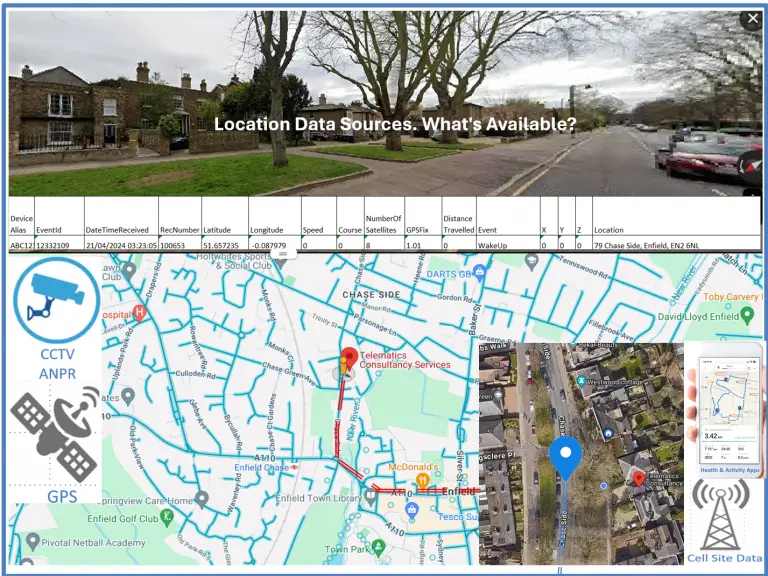
Although Telematics/Vehicle Tracking-generated GPS location data is the primary source for an Expert Witness report or expert advice when analysing a vehicle’s location is required, there are several alternative sources of location data. Each has its advantages and disadvantages in terms of data accuracy and the frequency of location data recorded.
- Vehicle Telematics/Vehicle Tracking
- The most common source of location data is with Telematics /Vehicle tracking installed on a wide range of vehicles, including;
- Commercial vehicles, Rental fleets, personal vehicle tracking devices
- The location data can be exported from the software application that tracks the vehicle. Still, the data will only include basic information about the location, possibly just an address, latitude, and longitude, plus the date/time. Additional data such as satellite quality, unique record and event numbers, and X, Y, and Z values would typically not be included.
- It is still valuable information, but it lacks detail and is therefore limited in the analysis that can be done.
- The most common source of location data is with Telematics /Vehicle tracking installed on a wide range of vehicles, including;
- Vehicle Telematics/Vehicle Tracking
- SatNav units
- SatNav units, such as Garmin products, are used as an alternative to navigation apps like Google Maps on smartphones, and many models are available for use in motorbikes and cars.
- Most of these products allow exporting location history with varying levels of detail. Generally, the data contains a latitude and longitude record with a date and time stamp.
- Data files typically require conversion to allow initial analysis in Excel or similar, and further formatting can be applied to view the location data in a mapping application such as Google Earth.
- SatNav units, such as Garmin products, are used as an alternative to navigation apps like Google Maps on smartphones, and many models are available for use in motorbikes and cars.
- SatNav units
- Smartphone Activity Trackers and Health Apps
- Many different health and activity applications are available for iPhones and Android OS smartphones. Some are installed as default applications, and others are free or subscription-based apps available from the Apple Store or Google Play.
- The data are available for export, and the level of detail varies by app. Some contain GPS data from the phone’s built-in GPS receiver, while others may only include data such as the number of steps taken.
- The data can be cross-referenced with other location data, and even the number of steps taken can indicate movement from one location to another.
- Many different health and activity applications are available for iPhones and Android OS smartphones. Some are installed as default applications, and others are free or subscription-based apps available from the Apple Store or Google Play.
- Smartphone Activity Trackers and Health Apps
- Google Timeline
- Google Maps Timeline is a personal map that helps users remember routes taken, places visited, when they visited them, travel time, and the mode of travel, such as walking, driving, or public transport. It is available on iPhones and Android phones.
- The app requires users to activate Location History on their phones and have a Google account to record journeys and places visited.
- Location history can be viewed in Google Maps via the Timeline function and exported for analysis. Once exported, the data file requires conversion to allow the location and associated data to be analysed in detail.
- Although the data’s use is limited, it remains useful due to its frequent updates and the user’s ability to edit and delete it. Data analysis can usually identify when location data has been edited or deleted.
- Google Timeline data can be beneficial for cross-referencing with other location data or for confirming the phone’s location at a specific date and time.
- Google Maps Timeline is a personal map that helps users remember routes taken, places visited, when they visited them, travel time, and the mode of travel, such as walking, driving, or public transport. It is available on iPhones and Android phones.
- Google Timeline
- Cell Site / Call Data records
- Cell Site Records: These are similar to call data records, which contain the date, time, and the other number the phone was in contact with, as well as the type of contact: SMS, MMS (both kinds of text messages), or a regular phone call. In addition, the cell site data includes “cells” used to connect the provided calls or texts.
- With suitable call data records, the cell site location is also available and can be cross-referenced with GPS location data. Do any GPS locations fall within the identified cell site’s coverage area?
- The location of any phone identified in the cell site/call data records will always be an area, not a specific location. This is due to several factors, such as cell height, cell type, the technology it uses, and the surrounding terrain. Cells can provide service over relatively short distances of ½ to 1 km, up to several kilometres, in an arc centred on the cell.
- Cell Site / Call Data records
- Automatic Number Plate Recognition ( ANPR )
- As a vehicle passes an ANPR camera, its registration number is read and checked against database records of vehicles of interest. A record of all vehicles passing by a camera is stored, including those for vehicles not known to be of interest at the time of the read. ANPR data from each police force is stored together with similar data from other forces for one year.
- Vehicle cloning, where a different number plate is put on a vehicle to hide its identity, may result in a vehicle being captured on camera at a location it has never visited.
- The vehicle’s location captured by an ANPR camera is based on the camera’s known location and can be cross-referenced against any GPS location data. Unlike cell site/call data records, the area of ANPR data is more specific.
- Automatic Number Plate Recognition ( ANPR )
